Product Information
GCS Ware Counter Strike 2 External Cheat
GCS Ware is a lightweight external cheat for CS2 that focuses on keeping your FPS high. It’s a great choice if you need a safe, legit-looking config without complex setups that drag down your PC performance.🎯 Legit Aimbot & Triggerbot
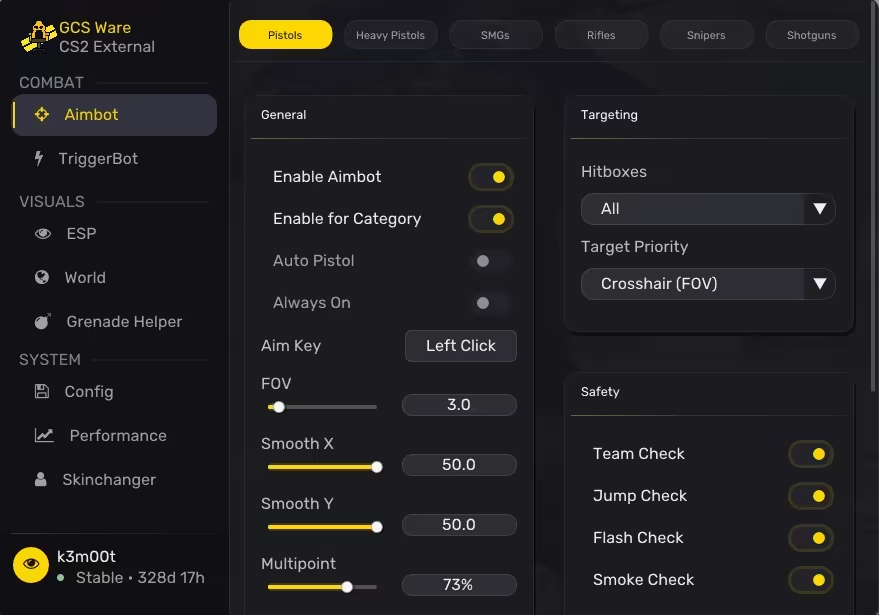
The Aimbot is built to look natural. You can adjust Smoothness and FOV separately for different weapon categories like Pistols. Crucially, it has Safety Checks- it won't lock on if you are flashed, in smoke, or jumping, which saves you from obvious Overwatch bans. You can also pick specific body parts (Head, Chest, Legs) and use the Triggerbot with a custom delay for holding angles.👀 ESP & Wallhack Visuals
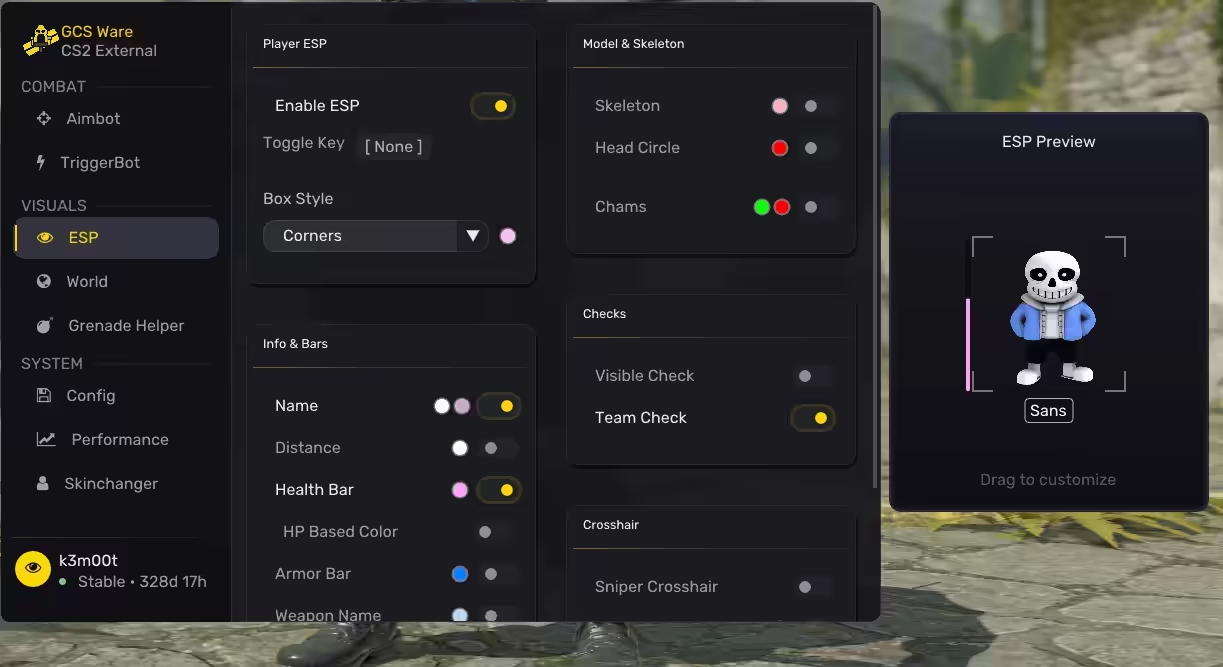
Clean Visuals that give you the info you need. The ESP includes 2D Boxes, Skeletons, and HP-based Health Bars. You can fully customize the colors for every element, so the Wallhack is visible but doesn't distract you from aiming. It’s simple, readable, and lag-free.🛠️ Bunnyhop & Misc
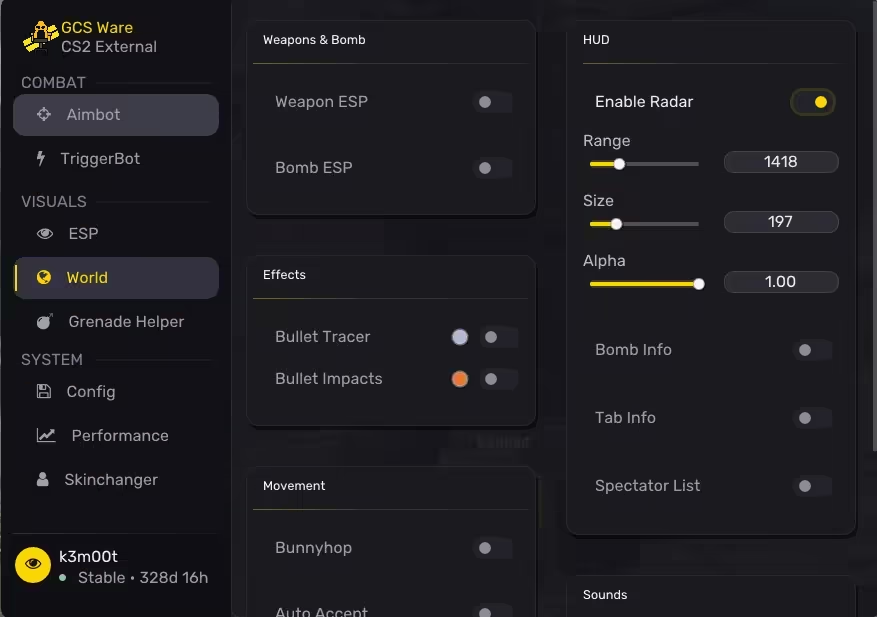
For movement, you get a Bunnyhop script with a "Legit" mode that misses perfect jumps occasionally to look human, or a "Perfect" mode for speed. The Misc tab also includes a Bomb Timer and an external Radar to track enemies without looking at walls.🚀 Performance Mode (Potato PC)
This is the standout feature. If you have an older computer, you can limit the cheat's overlay refresh rate. Settings like "60 FPS (Potato PC)" or "144 FPS (Weak PC)" ensure the software uses minimal CPU, keeping your game smooth while still providing visual assistance.Frequently Asked Questions
Cheaters' Questions? We've Got Answers!What is GCS Ware and what makes it a good starting point for CS2 cheating?
GCS Ware is GCS Cheats' own lightweight external CS2 cheat, designed to be fast to set up and easy to use without complex configuration requirements. Its standout feature is a focus on keeping FPS high - the external architecture and optimized rendering ensure the overlay doesn't impact game performance. This makes it a particularly good choice for players on mid-range hardware who need to maintain high, consistent framerates for competitive play. The feature set is focused on essentials: a legit aimbot with safety checks, clean 2D box and skeleton ESP with customizable colors, and a triggerbot for holding angles.
What are the safety checks built into GCS Ware's aimbot?
GCS Ware's aimbot includes built-in safety logic that prevents it from firing in situations that would produce obviously suspicious kills: it won't lock on while you're flashed (shooting accurately when blinded is an immediate Overwatch red flag), it skips targets inside smoke grenades (accurate shots into smokes with no source of information are a well-known detection tell), and it disables during jump animations (mid-air accurate fire is statistically impossible and gets flagged). These checks are automatic - you don't need to manage them manually. They significantly reduce the behavioral footprint of using the aimbot in ranked play, where automated analysis looks specifically for these violation patterns.
Can GCS Ware be configured differently for pistols versus rifles?
Yes - GCS Ware supports separate FOV and smoothness settings for Pistols as a distinct weapon category. The aimbot adapts its behavior when you're holding a pistol versus a rifle, which matters because pistol rounds in CS2 require a different engagement style (tighter, faster angles at close range) compared to rifle play. This per-category approach prevents the problem of applying rifle-tuned settings to pistol duels where they'd look or feel wrong. Triggerbot can similarly be configured with a custom delay per weapon type so that slower weapons don't fire before the shot registers accurately.
How does GCS Ware's ESP compare to more feature-heavy alternatives?
GCS Ware's ESP is deliberately clean and minimal: 2D boxes, skeletons, and HP-based health bars with full color customization. It doesn't include Sound Visuals, inventory read, or complex multi-layer overlays. This minimalist approach is actually beneficial in two ways: less visual noise means faster information processing in chaotic rounds, and fewer overlay elements means less chance of accidentally revealing information on stream that shouldn't be visible. For players who find heavy ESP distracting or want to maintain a cleaner game view, GCS Ware's streamlined overlay is a feature rather than a limitation.
Is GCS Ware appropriate for a player's first CS2 cheat purchase?
GCS Ware is one of the most appropriate first purchases for several reasons: it's the store's own product with direct support, its setup is straightforward without driver or BIOS complications, the feature set is focused enough that new users aren't overwhelmed by configuration options, and the legit safety checks prevent the most common beginner mistake of accidentally producing impossible kills. The FPS-optimized external architecture also avoids the performance complaints that some heavier internal cheats generate on mid-range systems. If this is your first CS2 cheat, GCS Ware provides a clean, supported introduction to the toolset.
What happens if GCS Ware becomes incompatible after a CS2 update and how quickly is it fixed?
When a CS2 update changes memory offsets, GCS Ware requires an update before it can be used safely again. As GCS Cheats' own product, GCS Ware receives direct update priority - there's no third-party developer to coordinate with, so offset patches are deployed as fast as the development team can validate them. During an update window, the product status page shows 'Updating' - do not run GCS Ware until status returns to 'Undetected'. Major game patches typically require 12-24 hours; smaller hotfixes are sometimes resolved within hours. Subscription time that passes during an update window where the product was unavailable is tracked, and support can arrange extension credit for extended outages. The GCS Cheats Discord is the fastest way to monitor update status in real time since announcements post immediately when a patch drops and when the update clears.
How should I configure GCS Ware for AWP one-shot duels versus rifle spray situations specifically?
AWP configuration: set aimbot Smoothness to 8-9 (slow, deliberate crosshair movement toward target), FOV to 3-4 degrees (aimbot only kicks in when you're already nearly on target), and enable Triggerbot with a 60-80ms delay (fires when on target but with a slight human-plausible reaction window). Disable RCS entirely for AWP since the rifle has no spray. Rifle configuration: Smoothness at 6-7, FOV at 5-8 degrees, RCS at 70-80% (partial recoil correction that looks like skilled spray control), Triggerbot optional with 0ms delay for burst-fire scenarios. The key insight is that AWP benefits from precision-focused settings with slow aim assistance and a slight trigger delay, while rifle play benefits from more active aim assistance with partial RCS. GCS Ware's built-in safety checks (no firing while flashed, no firing in smoke) apply in both weapon modes automatically.
Why choose GCS?
Premium Experience
Enhance your gaming performance with the best customizable tools. GCS Cheats provides the best aimbot, ESP, and wallhack cheats designed to give you the absolute competitive edge you need instantly.
Supported Games
We support over 30 multiplayer games across FPS, Battle Royale, and Survival - our configs are expertly tailored for flawless triggerbot, no recoil, and radar across all titles, updated after every patch, for all skill levels.
Undetected & Secure
We prioritize strict account security. Our unique, advanced kernel-level and driver-based bypass methods keep your account completely safe whether you prefer subtle legit play or HVH rage settings, with stream proof support included.